Your YouTube channel,
live around the clock.

LoopStream Live loops your pre-recorded videos or playlists as a nonstop live stream. Set it up from your phone in a minute. It runs in the cloud, so nothing on your side has to stay on.

Free plan · No card needed · Weekly plans, no subscription · Android app coming soon

LoopStream LiveStreamsBillingSettings
3 liveloopstreamlive.com

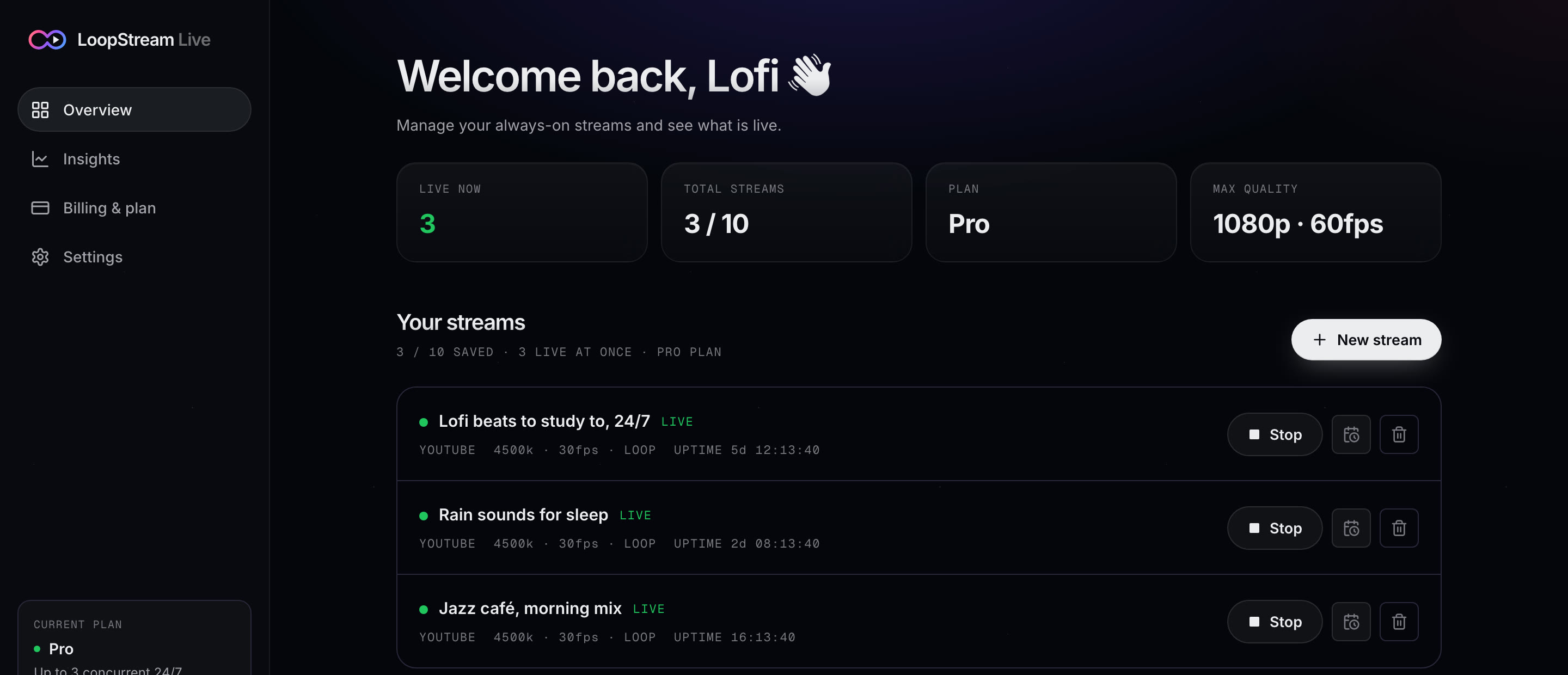
Not a mockup. The actual LoopStream Live dashboard, recorded with streams live.

Streams to the platforms and pulls from the files you already use

YouTubeFacebook LiveTwitchKickGoogle DriveDropboxAny RTMP serverPlaylistsSchedulesAuto-reconnect

See it live

Watch a stream go live in 30 seconds.

Everything a 24/7 channel needs

Set it once. It keeps going while you sleep.

Every part is built for streams that never end: no gaps between loops, no restarts by hand, nothing left running on your side.

Live on YouTube · Lofi beats, 24/7

Playlist of 3 · looping

Live for

5d 07:41

AND COUNTING · 02s

Loops forever, as one stream

Your video plays on repeat as a single unbroken live broadcast. No gaps between loops, no restarting it yourself.

Playlist

1study-session-1.mp4
▶rainy-night.mp4
3deep-focus.mp4

Playlists

Line up several videos. They play in order, then start again from the first.

Add a video

Upload from your phoneGoogle Drive linkDropbox linkSeveral files

No huge uploads over mobile data

Paste a share link and the file is fetched for you, server to server.

When YouTube drops

Connection lost at 38:12

Reconnecting…

Resumed at 38:12

Reconnects and resumes

Picks up mid-video, not from 0:00.

Schedule

Starts Fri, 9:00 PM

Repeats every day

Schedules

Start and stop at set times, once or daily.

Your devices

Phone asleepStill live

Runs in the cloud

Lock your phone, shut your laptop. It keeps streaming.

And alsoFacebook LiveTwitchKickAny RTMP server1080p on paid plansNo watermark on paid plansUptime trackingEmail alert if a stream stops

A look inside

Set it up in a minute. Then forget it's there.

A calm dashboard on the web and in the app, with every control where you'd expect it.

Every stream, one screen.

Control room

Every stream, one screen.

See what's live, how long it has been up, and what's scheduled next. Start, stop or change any stream in a tap.

  • Live status and uptime for each stream
  • Start, stop and schedule in one place
  • Works the same on your phone
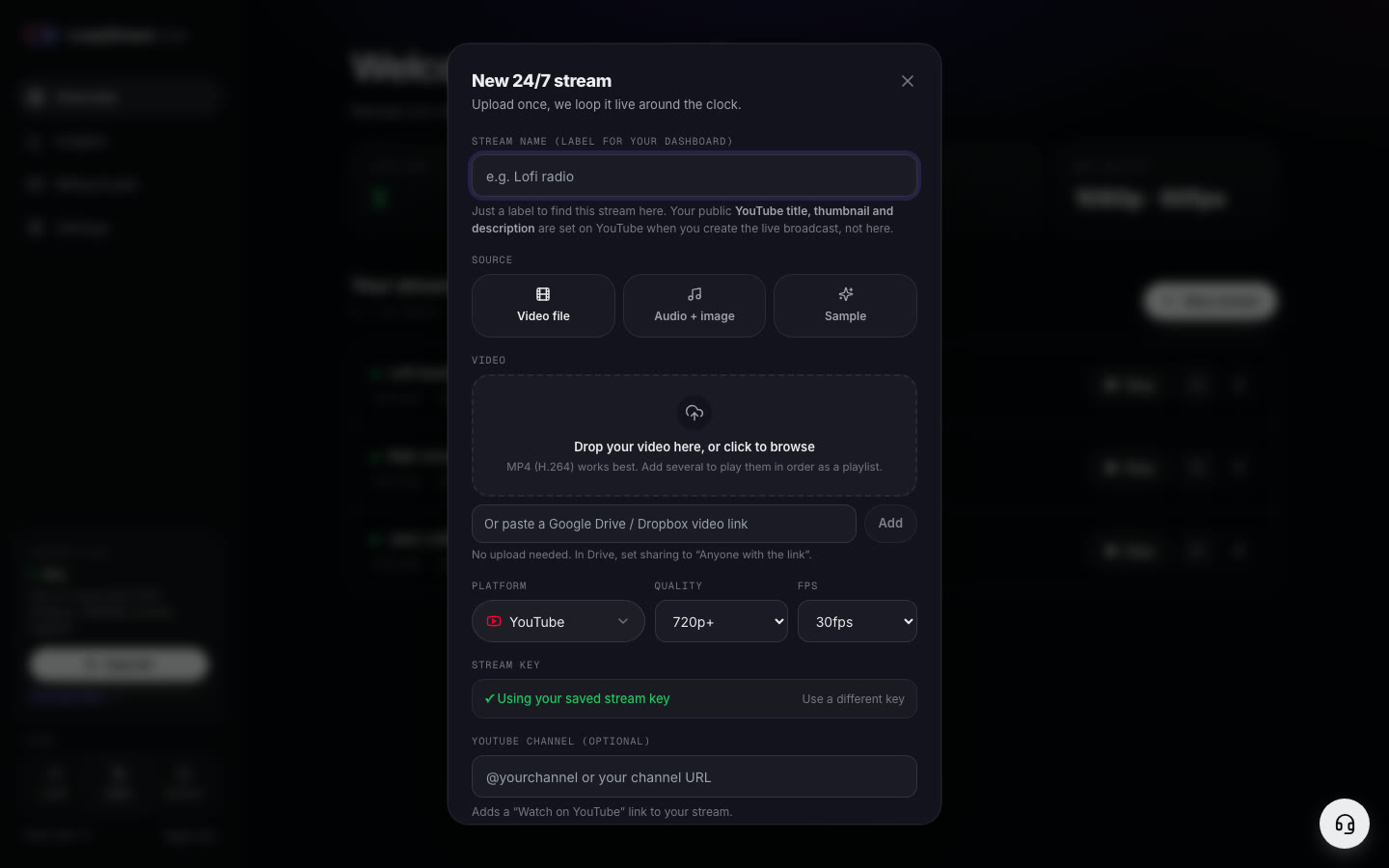
Add a video. Paste your key. Go.

New stream

Add a video. Paste your key. Go.

Upload a file, paste a Google Drive or Dropbox link, or line up a playlist. Pick YouTube or another platform, add your stream key, and you're live.

  • Video file, audio + image, or a sample to start
  • Drive and Dropbox links, no upload needed
  • Your saved stream key, reused for next time

Up and running

Three steps. About a minute.

No encoder, no server, no computer left on overnight.

1

Add your video

Upload it or paste a Google Drive or Dropbox link. Add more for a playlist.

2

Paste your stream key

Copy it once from YouTube Studio. We check it before you go live.

3

Tap Go Live

Your video loops live from our servers. Close the app, it keeps going.

Cloud. Hands-free. Private.

Built so you never have to babysit it.

24/7

live

Round the clock, on repeat.

0

devices left on

Not your phone, not your PC.

~1min

to set up

Video, key, Go Live.

4+

platforms

YouTube, Facebook, Twitch, Kick.

Your channel stays yours.

Keys stored encrypted

Your stream key is encrypted at rest and only used to send your stream.

No password needed

Going live only takes your stream key. Your YouTube password never comes near us.

Your content, your rights

We only stream what you upload or link, to the channel you choose.

The loop stream app

Everything about 24/7 loop streams. In one place.

LoopStream Live is a loop stream app for YouTube Live, also searched for as a stream loop app. It takes a pre-recorded video, or a playlist of videos, and broadcasts it as one continuous 24/7 live stream from our cloud servers. You set it up from your phone or a web browser in about a minute, and nothing on your side has to stay switched on.

01

Why run a loop live stream on YouTube?

A live stream lives in different places on YouTube than a normal upload. It carries the red LIVE badge, it sits in the Live tab on your channel, and viewers can chat with each other while they watch. A 24/7 loop live stream keeps that presence switched on all day and all night, using videos you have already made.

That is why so many background-listening channels run this way. When people leave a stream playing while they study, sleep or work, a loop is not a problem. It is the point. Common examples include:

  • Lofi, jazz and focus music radios
  • Rain, ocean, fireplace and white noise for sleep
  • Meditation and calm ambience
  • Church services, bhajans, kirtan and Quran recitation replays
  • Podcast and talk show reruns
  • Nature cams, scenic drives and slow TV
  • Menu boards and product loops for shops and cafes

A loop stream also gives an existing video library a second life. A long mix that gets a few views as an upload can keep an audience company around the clock as a live broadcast.
02

How does a stream loop work?

Behind the scenes, a live stream is a video signal sent to YouTube over RTMP, the same protocol OBS Studio and hardware encoders use. YouTube identifies your channel by the stream key you copy from YouTube Studio. LoopStream Live encodes your video on a cloud server, sends it to YouTube with that key, and starts it again the moment it ends, so viewers see one unbroken broadcast instead of a stream that stops and restarts.

If you add several videos, they play in order as a playlist and then start over from the first one. If YouTube drops the connection, which happens to every stream that runs for days, StreamLoop Live reconnects on its own and resumes from the point the video had reached rather than jumping back to 0:00. You can also schedule a stream to start and stop at set times, once or every day.

The free plan streams at 720p with a small watermark and a daily time limit. Weekly plans, opening at launch, remove the daily limit and the watermark. For the full setup in YouTube Studio, read our step-by-step guide to looping a video on YouTube Live.

03

A YouTube live stream app that doesn't use your camera

Most YouTube live stream apps stream whatever your phone's camera sees, which means the phone has to stay on, awake and connected for the whole broadcast. LoopStream Live works the other way around. Your phone is only the remote control. You choose the video and the channel, tap Go Live, and the stream itself runs on our servers.

That changes what live streaming from a phone costs you. There is no battery drain while you are live, no heat, and no mobile data used once the video is in. You don't even need to upload big files over mobile data: paste a Google Drive or Dropbox share link and the video is copied to our servers directly.

The Android app is coming soon. Today, the same dashboard works in any phone or desktop browser, including Safari on iPhone.

04

LoopStream Live vs Streamloop, OBS, a VPS, or a PC left on

You can loop a video with free software, but every do-it-yourself route ties the stream to a machine you have to look after.

  • OBS Studio on your computer: free to install, but the computer must stay on, awake and online around the clock, and a Windows update or a Wi-Fi drop at 3 AM ends the stream.
  • A rented VPS running FFmpeg: no home computer needed, but you set up the server, write the loop command and restart it yourself when it fails.
  • Other cloud loop services, such as Streamloop: these also stream from the cloud, so compare them on how you pay, whether there is a free plan to test with, and whether the stream resumes where it left off after a drop.
  • LoopStream Live: no software and no server to manage. Add a video, paste your stream key, go live. It reconnects and resumes on its own, has a free plan, and is paid by the week with no subscription.

If you searched for Streamloop and landed here, note that LoopStream Live is a separate, independent service. The idea is the same, a pre-recorded video running as a 24/7 live stream from the cloud, so it is worth trying both on the free plan and keeping the one that suits your channel.

If you already run OBS for live gaming or camera streams, keep it for that. A loop stream is a different job: the same file, on repeat, for days or weeks, which is exactly the kind of work a cloud service handles better than a home computer.

05

What do you need to start a 24/7 loop stream?

  • A YouTube channel with live streaming turned on. The first time, YouTube asks you to verify a phone number and activation can take up to 24 hours.
  • A video you own or are licensed to use. MP4 files with H.264 video and AAC audio work best, at 720p or 1080p and a steady 30 frames per second.
  • Your stream key, from YouTube Studio under Create, then Go live, then the Stream tab.
  • A free LoopStream Live account. No card is needed to start.

Facebook Live, Twitch, Kick and any custom RTMP server work the same way: paste that platform's server address and stream key instead of YouTube's.

Pricing is simple. Start on the free plan to test the stream on your own channel. When you want it live around the clock, buy a weekly plan: seven days at a time, no subscription and no auto-renew, so you only pay for the weeks you stream. The first 500 accounts keep the launch price for life.

06

Tips for a channel that stays live around the clock

  • Make the playlist at least an hour long so regular viewers don't see the same clip every visit.
  • Add a short fade at the start and end of each video so the loop point is smooth.
  • Put what the stream is and 24/7 in the title, for example "Rain sounds for sleep, 24/7", and use a clear thumbnail.
  • Say in the description that the stream is a looped recording. Honest titles keep viewers and keep you within YouTube's rules on misleading content.
  • Only stream music and video you have the rights to. YouTube's Content ID checks live streams too.
  • Check the stream health panel in YouTube Studio once after going live. It should read Excellent or Good.

Pricing

Pay by the week. Stop anytime.

No subscription and no auto-renew. Buy a week when you want your channel live, skip the weeks you don't.

Free

Free

No card needed · Try it on your channel

  • 1 stream live at a time
  • Daily time limit
  • 720p with a small watermark
  • Uploads, Drive and Dropbox links
Start free

Weekly

Founding price

Soon

7 days at a time · No auto-renew

  • Live 24/7, no daily limit
  • No watermark
  • Playlists and schedules
  • The first 500 accounts keep the launch price for life
Claim a founding spot

Prices announced at launch. Paid in-app on Android through Google Play.

FAQ

Questions, answered.

Something else on your mind? Get in touch.

Or read how to loop a video on YouTube Live.

Does my phone or computer need to stay on?

No. Once you tap Go Live, the stream runs on our servers. You can lock your phone, close the app or turn your computer off.

Is this allowed on YouTube?

Yes. You stream your own video to your own channel with your own stream key, the same way any streaming software does. Only stream content you have the rights to.

Is it a subscription?

No. Plans are sold by the week and don't renew on their own. When your week ends, you decide whether to buy another.

Can I loop more than one video?

Yes. Add several videos to a playlist. They play in order, then start again from the first.

What happens if the stream drops?

It reconnects automatically and picks up where the video was, instead of starting again from the beginning.

What is the founding price?

The first 500 accounts keep the launch weekly price for life, even if prices go up later.

What is a loop stream (or stream loop)?

A loop stream, also called a stream loop, is a live broadcast made from a pre-recorded video that plays on repeat with no gap between loops. To viewers it looks and behaves like any other live stream, including the LIVE badge and live chat.

Is LoopStream Live a YouTube live stream app?

Yes. It is a live stream app built for 24/7 loops: you set up and control the stream from your phone or browser, and the broadcast runs from the cloud instead of from your phone's camera.

Does it work on iPhone?

The dashboard works in Safari and any other mobile browser today. The Android app is coming soon.

Keep your channel live tonight.

Free to start. Takes a minute. You'll wonder why your channel was ever offline.

Start streaming Android app coming soon

Free plan · No card needed · Weekly plans, no subscription